Currency Converter Chrome Extension – A Deep Dive

Introduction
Shopping online has never been simpler, but one problem remains surprisingly common: prices are often displayed in currencies that do not match the shopper’s own expectations. A product listed in US dollars may feel completely different to someone browsing from Bangladesh, the UK, or Japan. For many users, the friction is not in finding the product, but in mentally converting the price into a currency they understand.
That is the problem this extension solves.
The Currency Converter Chrome Extension is a lightweight browser tool designed to make online shopping feel more intuitive. Instead of manually translating every price in your head, the extension detects prices on supported e-commerce pages and overlays a converted value in your preferred currency. The result is a smoother, more familiar browsing experience that helps users compare products without leaving the page.
Because the source repository is private and only the Chrome Web Store listing is meant to be public, this post focuses on the product experience, the architecture behind it, and the technical choices that make it work reliably.
What the Extension Does
At its core, the extension performs three tasks in a seamless loop:
- It detects prices visible on a webpage.
- It identifies the currency associated with each price.
- It displays a converted value in a target currency selected by the user.
This is not a traditional currency calculator that only works when you manually paste in a value. Instead, it acts like a quiet layer over the web page itself. When a user visits an e-commerce site such as Amazon, AliExpress, Walmart, eBay, Temu, or a generic product page, the extension scans the page and recognizes price-related content automatically.
Once a price is found, the extension attaches a small visual annotation—often a tooltip or inline label—showing the converted amount. The user can then quickly see what a product would cost in a currency they know well, such as Bangladeshi Taka (BDT), without interrupting their browsing flow.
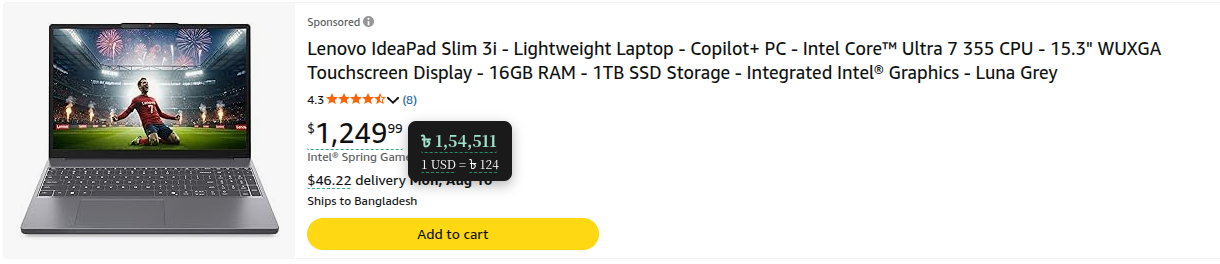 Screenshot taken from Amazon.
This makes the extension especially useful for:
- Shoppers comparing international products
- Users who prefer local currencies for budgeting
- People unfamiliar with the original currency format
- Customers trying to interpret deals, discounts, and final totals quickly
Why It Matters
The modern web is global, but the shopping experience is still often local in feel. A product page might list a price in USD, EUR, or AUD, but a customer in Bangladesh may prefer BDT. The mismatch is not just aesthetic; it affects decision-making.
For instance, a price like “$29.99” may appear cheap at first glance, but when translated into BDT it could feel very different depending on the current exchange rate. The extension helps bridge that gap by making currency conversion visible and immediate.
Instead of forcing users to open a separate calculator or search engine, it delivers the information directly where they need it: on the page they are already viewing.
How It Works
The extension is built around a simple but effective pipeline.
1. Detecting Price Content
The first step is recognizing prices in the Document Object Model (DOM). The extension scans the page for numeric values accompanied by currency symbols or currency codes. This includes examples such as:
- $19.99
- €45
- £12.50
- ৳3,200
- BDT3200
- NZD 80
The detection logic is intentionally flexible. It looks not only for traditional currency symbols but also for shortcodes such as USD, EUR, BDT, and NZD. That makes the converter more robust across different websites and international pricing styles.
2. Identifying the Currency
Once a price-like value is found, the extension maps it to an internal currency definition. This is handled through a currency dictionary that stores metadata about each supported currency, including:
- the display symbol
- the ISO code
- the currency name
- the number of decimal places used for formatting
For example, a currency entry may include both the symbol and the short code, allowing the extension to recognize either form. This is important because different websites use different conventions. Some show prices as “$50”, while others use “USD50” or “US$50”.
3. Fetching Exchange Rates
After detecting a price and identifying the currency, the extension needs a current exchange rate. It does this by communicating with a background service worker, which fetches exchange-rate information from the Frankfurter API.
The background layer acts as a central worker for network tasks. Instead of making requests directly from every page context, the extension routes rate-fetching through the background script. That keeps the logic centralized and makes it easier to cache results.
4. Formatting the Converted Value
Once the exchange rate is retrieved, the extension calculates the converted amount and formats it for display. Formatting is important because a converted number should not just be mathematically correct, but also readable.
The extension uses currency-specific formatting rules so that values appear in a natural style for the selected target currency. For example, the number of decimal places, thousands separators, and decimal separators are adjusted based on the currency definition.
5. Injecting a Visual Overlay
The final step is presentation. The extension adds a lightweight annotation near the original price, usually in the form of a tooltip or inline label. This overlay shows the converted value so that the user can understand the price immediately.
The experience is intentionally non-intrusive. The original price remains intact, and the added conversion is supplemental rather than disruptive.
The Architecture Behind the Extension
The extension is organized into a small but well-structured set of files.
Manifest and Background Logic
The manifest file defines the extension’s permissions, content-script behavior, and service-worker configuration. The background script handles tasks such as:
- receiving requests from content scripts
- fetching exchange rates
- storing cached rates locally
- responding with the latest values
This background layer is crucial because it keeps the extension responsive and avoids repeatedly hitting the exchange-rate service for every price on the page.
Content Scripts
The content script is the brain of the user-facing experience. It is responsible for scanning the page, matching price patterns, identifying currencies, requesting conversion data, and injecting the visual overlay.
In practice, this means the content script performs the page-level analysis while the background script handles the network-heavy work.
Currency Definitions
The currency dictionary stores the metadata needed to recognize and format currencies. Instead of hard-coding each behavior in the main logic, the extension keeps currency information in a dedicated data file. That makes it easier to expand support for additional currencies later.
Site-Specific Adapters
One of the most interesting parts of the extension is its support for site-specific behavior. E-commerce websites often structure their markup differently. A price on Amazon might be nested differently from a price on AliExpress, eBay, or Walmart. Because of that, the extension includes specialized adapters for different sites.
These adapters help the script understand where prices are likely to appear and what DOM patterns should be considered. A generic fallback is also included for websites that do not match one of the known patterns.
This approach makes the extension more reliable because it avoids assuming every page uses the same structure.
Why the Service Worker Design Was Important
One of the key technical decisions in the project was the use of a classic service worker rather than a module-based worker.
A module service worker would have caused issues with one of the extension’s core loading patterns because the background script relies on importScripts() to share the currency dictionary with the worker context. In a module-based worker, that mechanism is not supported, causing runtime errors.
By using a classic service worker, the extension could:
- load shared scripts correctly
- access the local currency data without complications
- register the background worker cleanly
- support the extension’s messaging architecture without breaking
This technical fix was not just a minor detail. It was essential to ensuring the extension could load and function reliably in Chrome.
Performance and User Experience
A successful browser extension must be both useful and unobtrusive. This project was designed with that balance in mind.
Caching for Efficiency
Exchange rates do not need to be fetched every single time a user views a page. To reduce unnecessary requests, the extension caches rates in local storage for a short period. That means repeated conversions can be served quickly without making a fresh API request every time.
This improves both speed and reliability. Users get near-instant feedback, and the extension avoids unnecessary network traffic.
Lightweight UI
The popup interface allows the user to choose a target currency, toggle the extension on or off, and view the last update time. The interface is intentionally minimal so it does not distract from the browsing experience.
The extension is designed to feel like a helpful utility rather than a heavy application. It works quietly in the background and only surfaces itself when needed.
How the Extension Handles Real-World Web Pages
The biggest challenge in building a price-conversion extension is not the math. The hard part is dealing with the astonishing variety of web pages that exist.
Some stores place prices inside compact product cards. Others display them inside hover panels. Some use special formatting, hidden text, or repeated price blocks. A single page can contain promotional prices, sale prices, original prices, partner offers, and shipping information, all within the same layout.
That is why the extension includes logic for different site structures. It is not enough to detect a number followed by a currency sign; the script must also avoid misidentifying unrelated content. It needs to focus on the pricing context, not just any numeric value on a page.
This is where the site-specific adapters and generic fallback come into play. They improve the probability that the extension will attach conversion annotations to the right elements without producing noisy or incorrect overlays.
Privacy and Simplicity
The extension is intentionally lightweight and does not require a complex account system or external login.
Its core behavior relies on:
- the browser’s local context
- the user’s selected target currency
- exchange-rate data fetched from an external API
The extension does not need to store sensitive user data in order to function. It mainly uses local storage for caching and browser messaging to coordinate between scripts.
That makes it easier to trust and easier to maintain.
Installation and Usage
For development testing, the extension can be loaded directly in Chrome through the Extensions page by enabling Developer mode and selecting the unpacked project folder.
Once installed, the user can:
- Open an e-commerce page
- Allow the extension to scan the page
- View converted prices inline or via hover annotations
- Change the desired target currency from the popup
The behavior is immediate enough to feel native. The user does not need to manually enter values or switch context; the conversion appears as part of the browsing experience.
What Makes the Project Interesting
What makes this extension compelling is not just that it converts currencies, but that it does so in a way that feels integrated into the browser experience.
It combines several pieces of modern web development:
- browser extension architecture
- content-script manipulation
- background service workers
- DOM analysis
- asynchronous API calls
- caching strategies
- cross-site compatibility
That combination makes the project more than a simple utility. It is a practical example of how browser extensions can enhance everyday online tasks in subtle but meaningful ways.
Future Possibilities
The current version already provides a useful experience, but there is plenty of room for growth.
Possible future improvements include:
- supporting multiple target currencies at once
- adding better localization and formatting rules
- improving dark-mode compatibility for tooltips
- expanding support for more storefronts and markup patterns
- adding optional API-key support for higher-rate limits
These ideas would make the extension even more flexible and polished, especially for users who rely on it heavily while shopping internationally.
Final Thoughts
The Currency Converter Chrome Extension is a small project with a very practical purpose: making international online shopping easier to understand. It takes a simple idea—currency conversion—and embeds it directly into the browsing experience so the user does not have to leave the page or think about it consciously.
What makes it stand out is the combination of simplicity and technical care. The project is easy to use, but behind the scenes it relies on a thoughtful architecture that handles price detection, currency recognition, exchange-rate fetching, and visual presentation in a coordinated way.
For a browser extension, that balance is exactly what matters most. The goal is not just to add a feature, but to make that feature feel natural, fast, and useful in everyday life.
If you enjoy using the extension, the best compliment is to keep it simple, reliable, and genuinely helpful for the people who need it most.